

A Better Way to Explore Your Travel Map: Trailmarker's New Map Layout
8/25/2026
A Better Way to Explore Your Travel Map
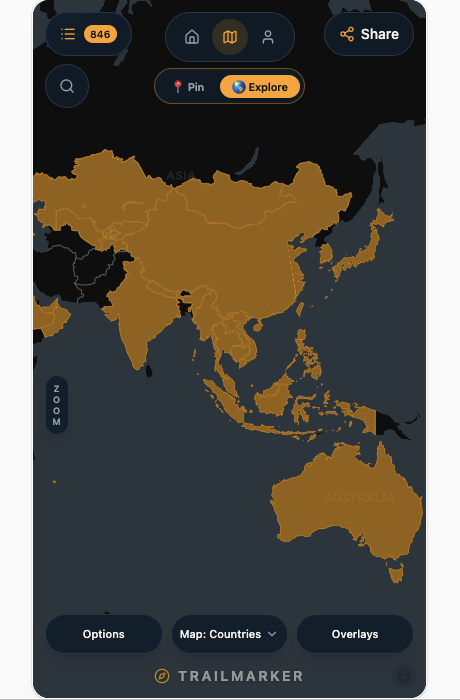
Your travel map should make it easy to see where you've been, discover where you want to go, and explore everything in between. That's why we've recently redesigned the Trailmarker map layout for both desktop and mobile. The map itself hasn't fundamentally changed, but the way you interact with it has. We've reorganized the controls to make the most important tools easier to find while giving the map more room to breathe.
Putting Pin and Explore Where You Need Them
One of the biggest changes is the new Pin / Explore control at the top of the map. When you want to add a destination to your map, you can switch to Pin mode. When you're simply looking around and exploring the places you've already marked or are interested in visiting, Explore mode lets you interact with the map without accidentally adding new destinations. Putting these two modes in a prominent position makes the distinction much clearer and makes it easier to understand what the map will do when you interact with it.
Giving Overlays Their Own Space
One of the best features about the Trailmarker app is the Overlays feature, which allows you to superimpose thousands of interesting sites onto your map in order to mark your previous travels or to plan your next adventure. As some of you know, the current overlay categories are National Parks, UNESCO World Heritage Sites, Michelin Restaurants, Wonders of the World, etc.
This feature is integral to Trailmarker functioning as a travel planner but we received some feedback that it may be hard for users to understand the overlay system and how to navigate it.
Solution: we've separated Overlays from the main map controls and given it its own box. Previously, overlays were tucked away inside of the broader view controls, but as Trailmarker adds more ways to explore the world, it became increasingly useful to give Overlays their own dedicated space.
This makes current and upcoming Overlay information easier to discover and use without adding unnecessary clutter to the main map interface. It also gives us room to continue expanding the overlay system in the future - we promise there’s more coming soon!
Smaller, Simpler Zoom Controls
We've made the zoom controls smaller as well. The new compact control sits along the side of the map, giving you quick access to zooming without taking up valuable space on the screen. It's a small change, but maps benefit from having as much unobstructed space as possible. The goal is for the controls to be available when you need them and largely disappear into the background when you don't.
Built for Both Desktop and Mobile
Trailmarker is designed to be useful wherever you are, whether you're planning a trip on a laptop or exploring a destination from your phone. Because of that, we didn't want the mobile experience to simply be a scaled-down version of the desktop map.
The controls have been reorganized to work better with smaller screens and touch interaction, while keeping the features you use most within easy reach. The result is a cleaner mobile map that gives more of the screen to the thing you're actually there to see: your map.
Making the Map Easier to Use
We didn't want to redesign the Trailmarker map simply for the sake of changing it. The places you've pinned, your travel history, your lists, your photos, and everything else you've added to Trailmarker are still there. Instead, this update is about making the experience of using your map more intuitive. You shouldn't have to search through menus to figure out how to add a pin, explore your destinations, or turn on an overlay. The controls should make sense when you see them.
This is especially important as Trailmarker continues to grow. The map is becoming capable of doing more, and organizing those capabilities well is just as important as adding new ones.
What's Next?
This update is another step toward making Trailmarker a better way to mark your trail, remember your travels, and discover where to go next. There's still plenty we'd like to improve, but we're excited about this new foundation for the map experience.
If you haven't explored the updated map yet, open Trailmarker and take a look around. Switch between Pin and Explore, try out the new overlays, and see how the new controls feel on your phone or desktop.
Your trail is waiting.