

Trailmarker's Newest Feature: Trips - Blog About Your Trip, Stop by Stop
10/20/2026
Trailmarker has given users a way to save their trip pins and journal about their travels within them. We've created the travel stories feature for users who want to write more and share their stories with their friends and family. It's natural that the next step would be to connect the two by allowing users to map and write about full trips!
And right on cue: we have added a new way to turn the places you've marked on Trailmarker into a stop-by-stop story of your journey. If you've ever wanted to blog about a trip without wrestling a website builder, this one's for you. Want a flashy cover photo with all of your stops for your blog? Give it a shot!
What is the Trips tab?
Open My Trips from the menu and you'll find a trip builder that works with the pins already on your map. Add stops from places you've pinned, search for a city, or tap the map. Put them in the order you traveled, and Trailmarker draws your route as you go.
Each stop can carry a photo from that pin, plus a short note: the café worth the wait, the viewpoint everyone skips. Between stops, record how you got there (car, train, bus, flight, boat or other), how long it took and what it cost. Then give the trip a title, a description, a trip length, a cover photo and a list of useful links.
Why travel bloggers will love it
Writing about a trip is the fun part. Formatting the itinerary and redrawing the route on a map is not. Trips handles the structure so you can focus on the story.
Your itinerary is built from real places, so readers see exactly how your days fit together on an actual map. And if you've added photos to your pins, they're already there: pick the best shot for each stop.
Logistics live where readers look for them. "How did you get there?" and "How much did it cost?" are the most common questions on any travel post. Trips brings it all together.
A great way to blog about a trip
A good travel blog post answers three questions: where did you go, what was it like, and how can I do it too? A Trips page answers all three in one place: the route map and stops, your photos and notes, and the transport, costs and links. It's the kind of itinerary readers bookmark before booking their own flights.
Once your trip is reviewed, it gets its own public page on Trailmarker, with your cover photo, your name in the byline, an interactive route map and the full itinerary. Shared links show your cover photo and the short summary you write, so it looks great in group chats, on social media and in search results. Link to it from your own blog, too.
Share it as a card, too
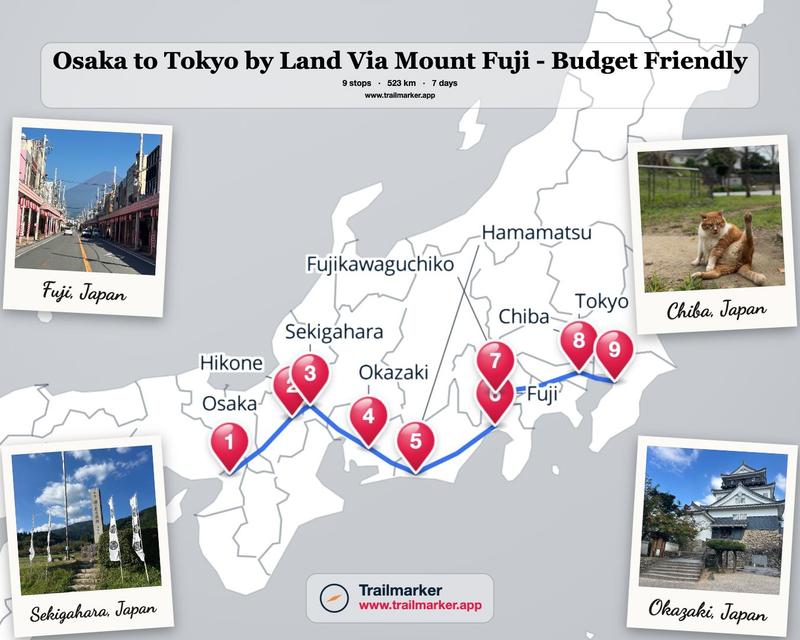
Not every audience wants to click through. Create a ready-to-post image of your route with numbered stops, sized for Instagram posts, stories and more. Try the Photo Display look, which frames your map with Polaroid-style shots from the trip, then grab ready-made hashtags to go with it.
How to publish your first trip
1. Open My Trips from the menu and start a new trip.
2. Add your stops in the order you traveled them.
3. For each stop, pick a photo, add a short note, and fill in how you got there.
4. Give the trip a title, a description, a cover photo and a short summary for sharing.
5. Click Submit.
Once it's posted, your trip appears in Travel Stories for the whole Trailmarker community and stays with your profile.
Your trips deserve more than just a camera roll.
You already did the hard part: you went. Head to My Trips and turn your next (or most recent) adventure into a trip your friends and family should be reading about. We can't wait to see where you've been.
Mark Your Trail.