

Trailmarker Share Cards: Turn Your Adventures Into Something You Can Share
9/29/2026
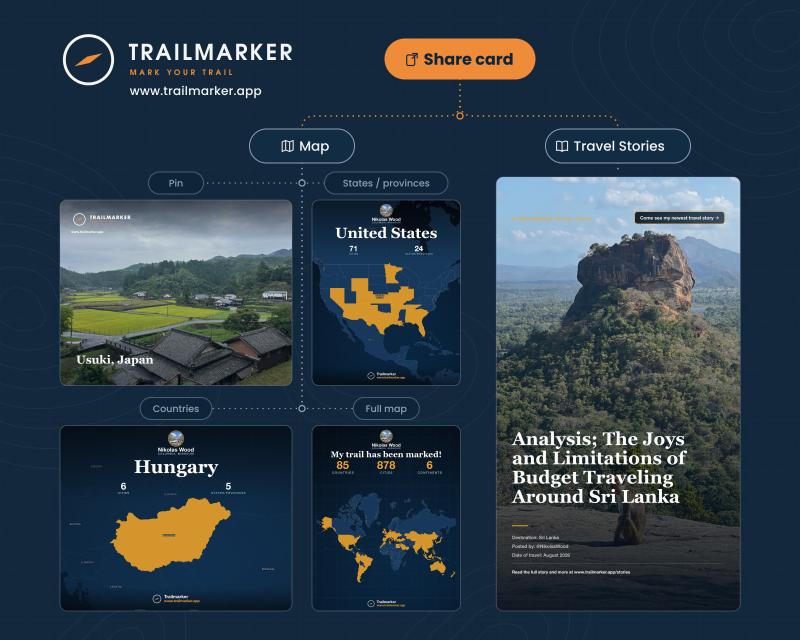
Let's be honest — a good chunk of the fun of backpacking through a new country, solo traveling across a continent, or visiting a city you’ve always dreamt of is snapping the photos and telling your people about it afterward. It’s a new experience and I’m a believer that new experiences give us life. If you've ever tried to explain your route through Southeast Asia using nothing but a camera roll and a vague wave of your hand, you know the struggle is real.
That's just one way in which Trailmarker share cards have got you covered.
If you're already using Trailmarker to pin your travels, you've probably noticed that your map is quietly turning into a pretty impressive record of everywhere you've been. Share cards are how you take that record and turn it into something you can actually share with your friends, post on your travel blog, or drop in the family group chat.
Here's the rundown on how they work, what they do, and why they might just become your favorite part of the app - they are definitely mine!
What Are Trailmarker Share Cards?
Think of share cards as snapshots of your travels — but instead of a blurry selfie in front of a monument, you're sharing a clean, customizable image that shows where you've been, what you've seen, and the stories behind it. Use your own photos, feed them through the Trailmarker share card studio, and then find your style for your own purposes.
Share cards come from two places at the moment:
1. The map — your pins, cities, states, provinces, and countries
2. Your travel stories — the writings and photos you've uploaded along the way
Both types are designed in the Share Cards Studio, which is exactly what it sounds like: a place where you can play around with layouts, colors, and formats until you land on something that looks like your style. And honestly - two minutes in there can produce a wild number of unique images. It's the kind of thing where you go in to make one card and come out with 4.
Map Share Cards are basically your travels, visualized via map and photos.
Map share cards pull directly from the pins on your Trailmarker map. Depending on how zoomed in or out you want to go, you can create cards at different levels:
City Share Cards
Say you pinned Reykjavík and uploaded a few photos from that trip — the northern lights, that one café you camped out in during a rainstorm, the rental car that barely made it. A city share card takes that single pin and displays it alongside the photos you attached to it.
It's a small, focused snapshot of one place. Great for a quick "remember this?" post, or for highlighting a specific stop on a longer adventure. Crossed off a bucket-list visit to Rome? This is the perfect way to celebrate it with your social circle.
State and Province Share Cards
Zoom out a bit and you've got states and provinces. If you've been road-tripping across the American West or hopping between Canadian provinces, this card shows which ones you've pinned within a country. It's a nice middle ground — more context than a single city, but not quite the whole picture. Especially nice if you enthusiastically love traveling in one country and want to celebrate your progress (for me it was Thailand, which is why I began working on the Trailmarker site!).
Country Share Cards
Country share cards are where things get real satisfying real quickly. Each one reports the cities and states you've visited within that country while displaying a map fine-tuned to your needs. Your Japan card might show “cities visited: 3” while displaying city pins for Tokyo, Osaka, and Kyoto. One quick click and it displays the prefectures in which your pins are located. Another click and it highlights all of Japan as your triumphant “look, I finally made it!”
For anyone who's been backpacking through multiple countries in one region, these cards are a great way to break down a big trip into digestible pieces and report back to those who are living vicariously through your adventure.
Whole Map Share Cards
Then there's the big one. The whole map share card is your entire travel history in a single image. It reports the headline numbers: total countries visited, total pins pinned, and whatever else you've logged over the years.
This is the card you make when someone asks "so where have you been?" and you want to answer without talking for twenty minutes. It's also weirdly motivating — seeing your total country count tick upward never gets old.
The whole map share card can be zoomed to show areas if you want to share something specific - you backpacked through 6 countries in Eastern Europe and you want to get a snapshot of your route. Use the whole map share card, zoom into that region, and click “save share card”… it’s as easy as that.
The other type of share card:
Travel Story Share Cards: Your Writing, Your Photos, Your Travels
The second type of share card comes from your travel stories — the writing you've uploaded to Trailmarker alongside your photos. No, not your personal travel journal entries which are locked in your pins, these come from the tab Travel Stories (www.trailmarker.app/stories).
If you've ever kept a travel blog, you know the drill: you pour hours into a post, hit publish, and then... nothing. Getting people to actually click through and read is half the battle. Travel story share cards are designed to help with that.
A travel story share card gives a preview of your writing using the photos you've uploaded with it. It's like a teaser trailer for your blog post — enough to hook someone, not so much that they feel like they've already read it.
These cards are customizable too, and the variety is the best part. Different layouts, different orientations, different ways of pairing text and images. You can make a travel story share card clean and minimal, or bold and photo-heavy. Make your story look like a magazine piece or like a movie flyer. Whatever fits the story you're telling.
My thought behind designing these share cards was ultimately to connect the traveler back into their social circle even if they are 5,000 miles away. Here are some reasons to use these share cards:
· Updating friends and family — if you're solo traveling for months at a time, dropping a story share card is a much more aesthetic way to check in than a "still alive, still in Japan" text.
· Celebrating the wins that mean the most to you — those bucket list items only get ticked off once, IF we are lucky. They are cause for celebration. Share your accomplishments with the people who care most about you.
· Promoting their own travel blog — if you write about your adventures, a share card is a built-in preview that links people back to the full post. It's a low-effort way to get more eyes on your writing using a sleek and easy cover photo template.
· creating your own lists for whatever weird collection you may be into - “here’s a list of the cities I’ve eaten McDonald’s in” (mine would be substantial), or “countries in which I’ve gone scuba diving,” or “states I’ve driven through for work.” Whatever list you’re interested in keeping, Trailmarker can help you keep it and build a sweet share card out of it.
Customization: The Fun Part
Here's the thing about share cards — they're not one-size-fits-all templates. The Share Cards Studio lets you mess with layouts, orientations, and designs until you've got something that actually looks good, no matter what your style is.
Want a vertical card for Instagram stories? Click. Want something wide and clean for a blog header? Click. Instagram story is too tall and skinny to make a post without cutting part of it off. Click. My aesthetic is using square photos online. Click. All done in 2 seconds.
The point is, you're not stuck with whatever the default happens to be. A couple of minutes of fiddling and you've got a card that feels personal. Feeling personal matters, because these are going to people who know you. A generic graphic doesn't hit the same way as something that actually reflects the way that you felt your trip.
Why Share Cards Are Worth Using
A few reasons, if you're on the fence:
They save you from explaining yourself. "I went to like nine countries" hits differently when there's an image showing exactly which nine.
They make your travels look as good as they felt. Your camera roll is chaos. Your share cards are not.
They work for any kind of traveler. Backpacking through hostels, solo traveling on a shoestring, weekend adventure trips, slow travel through one region for a year, luxury weekend in Cabo — the cards adapt to whatever your map looks like.
They give your travel stories a second life. If you've written something you're proud of, a share card helps more people actually see it. It’s a window into your travels and we want to make sure it gives a great view.
They're genuinely fun to make. This sounds like a small thing, but it isn't. There's something satisfying about turning a pile of pins and photos into a single image that says "here's what I've been up to" - especially if it includes a story or two about your time on the road.
Getting Started
If you're already on Trailmarker, you've got everything you need. As your map gets more filled in with pins, consider clicking the “create share card” button in the top right corner. Pick what kind of map card you’d like to share: one pin, one country, or the whole map, and then start playing. The map cards pull straight from your pins, so the more you've logged, the more there is to work with. On the other hand, to create a travel story share card, head over to the Travel Stories page (www.trailmarker.app/stories) and submit a story. Some basic info like destination, date of travel, and upload your photo (or pull one from one of your pins!) and voila. Once posted, the Travel Story reads just like a travel blog post, displaying your photos and your wisdoms from the road. At the top of the screen, click the “create share card” button to launch into the share card studio and design a style that’s right for you.
If you haven't started pinning yet — well, there's no time like the present. Every trip you take from here on out is another pin, another story, and eventually another share card. The map only gets more interesting the longer you keep at it - that’s the best part.
And the next time someone asks where you've been? You'll have an answer ready. Actually, probably several…
---
Trailmarker is built for travelers who want to remember where they've been — and share it in a way that actually does the trip justice. Whether you're backpacking solo through a new continent or planning your next adventure from the couch, Trailmarker is dedicated to helping you mark your trail.
- Nikolas Wood